Send Monitor State: Traktor's usual 500-message cut, measured
New to In and Out rows? Start with the mapping guide.
If you build two-way Traktor mappings — a controller with LEDs, a screen, or an iPad surface that shows what Traktor is doing — you depend on Traktor's MIDI Out. This page is what we — Interaktiv Audio, the two people behind Interaktiv Tap — measured while building its mapping: how the Send Monitor State command behaves, where it stops, why, and how conditions on Traktor's own state (not only modifiers) let you shape what comes back. Measured on Traktor Pro 4.5.1 on macOS 26.4.1 in September 2026, on the mapping as it then stood: 583 Out rows. Traktor Pro 3 behaves the same. The figures are ours; the method is at the end so you can check them on your own rig.
In short
- With Traktor's Send MIDI Clock setting on, a state dump usually stops at 500 messages. Keep what can be live at one time under 500.
- Conditions on Traktor's own state — Deck Flavor, Sample Page Selector, Slot State and 22 more — shape the dump and make Traktor send newly live rows by itself. A modifier flip sends nothing.
- Measured on Traktor Pro 4.5.1 in September 2026, on a 583-row mapping; Traktor Pro 3 behaves the same. The steps to repeat it are at the end; the full list of conditions is in the table.
#What Traktor sends back, and when
An Out row in Controller Manager sends a MIDI message whenever its command's value changes — a hot cue lights up, a loop size changes, a slot starts playing. That covers changes. It does not cover the moment your controller connects: until something changes, an LED shows whatever it showed before, which is a guess. The mapping guide explains In and Out rows if the terms are new.
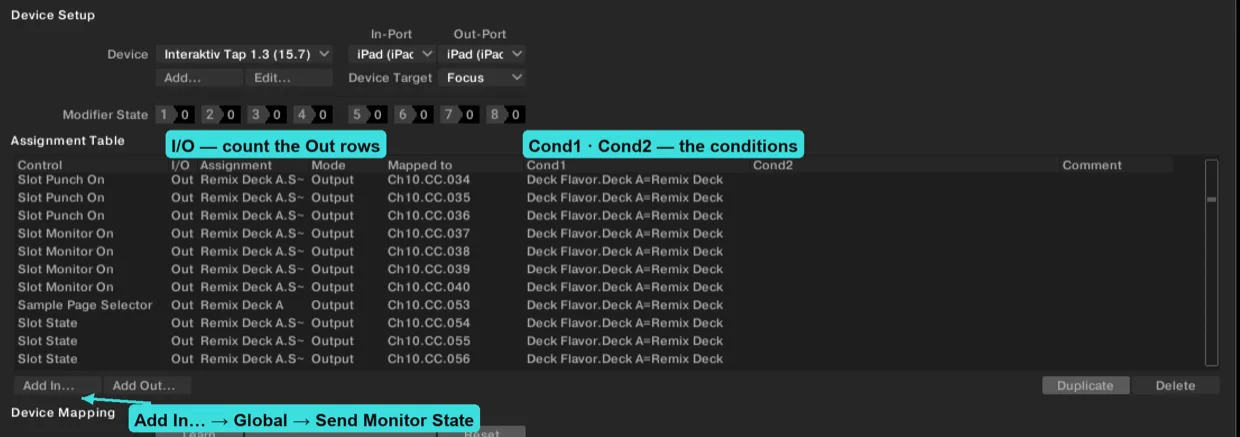
Send Monitor State is the command that fixes the guess. Map it to any input (the Add In… button under the assignment table → Global → Send Monitor State) and, when it fires, Traktor sends the current value of every Out row in that device's mapping, at once. Mapping builders call this a dump. Traktor also sends one unasked when it binds a device's Out-Port: when you assign the port in Controller Manager, and when Traktor starts with the controller already connected. That is the only time it volunteers state. Re-importing a mapping does not re-bind the port, so no dump follows, and we have not seen one when a controller is plugged in while Traktor is running. Everything else is on request — which is why the command exists.
A dump is only useful if it is whole. A surface that received 500 of 583 rows shows 83 stale values and has no way to know which.
#The 500-message cut
Our mapping then had 583 Out rows across four decks, four FX units and the mixer; it has grown since, and the worked example below uses today's count. The iPad was on a USB cable, enabled as a MIDI device in the Mac's Audio MIDI Setup, so Traktor saw an ordinary CoreMIDI port; on Windows it reaches Traktor through a virtual port our bridge app provides. With Send MIDI Clock ticked in Preferences → MIDI Clock, this is what arrived after Send Monitor State:
- 500 of 583 rows, in about 10 ms. Within one Traktor session the same rows were missing every time — scattered across channels, not the tail of the list. Restart Traktor and a different set goes missing, so there is no fixed list to publish.
- Asking again did not finish the job. The next dump in the same session was the same 500. Across three runs of twenty dumps, 57 of 60 carried exactly 500; the other three carried 555, 577 and 582. So a whole dump does get through occasionally — nothing past 500 is reliable.
- With Send MIDI Clock off, every dump arrived whole — and just as fast: a 303-row dump landed in about a millisecond, 25 ms after the request (measured 2026-09-06). Same port, same burst, no cut, which is why we read the limit as Traktor's and not the cable's. It reproduces on Windows as on the Mac, and on Traktor Pro 3 as on 4.
- The ceiling is per port, not per device. Two controllers assigned the same Out-Port share one budget of 500, and Traktor sends the first device's rows first, all of them, then the second's. A controller on its own Out-Port has its own 500.
- A dump of 500 rows or fewer arrived whole every time, setting on or off. After we brought the live set under the line (below), every dump we have seen on Mac and Windows was whole on the first ask. We did not count them; none was short.
We do not know why, and Native Instruments has not documented it. The rule you can plan around is the last bullet: keep what can be live at one time under 500. To see where you stand, count the rows marked Out in your device's I/O column. Most controller mappings are far under it, and for them the ceiling is not the problem — the next two sections are.
It is not new. A DJ TechTools reply from March 2011 reports “a full 1/2 second drop of all sound” every time Send Monitor State was used; a thread from August 2014 names the pairing in its title, “Audio glitch when Send MIDI clock on & Send Monitor State MIDI command is triggered”, and a video from November 2016 demonstrates the glitch on Traktor Pro 2.11, recorded to show Native Instruments it was still there. We hear it too, on Windows: at 583 rows every dump glitched the audio; with the 377-row mapping it is rare, and it comes back when state is requested often. Whether the size of a dump or how often it is asked for is what matters, we have not separated — so we do not tie the glitch to the 500 line.
#Conditions: Traktor's own state, not only modifiers
Every mapping row has two condition slots. Most guides fill them with modifiers, M1–M8, which are variables your own mapping sets. Open the condition menu, though, and below M8 sit 25 more entries that read Traktor's state (the table shows them in 18 rows; Hotcue 1–8 State is eight entries): whether a deck is playing, which flavor a deck is, which sample page a Remix deck shows, what a cell is doing. A row with a condition exists only while the condition is true — it is not in the dump, and it does not fire on change. Two conditions on one row are ANDed.
The full list, from Traktor Pro 4.5.1. A condition with a target applies to one deck, FX unit or slot. Most deck- and FX-unit-scoped conditions also offer Device Target, which follows the device's own target-deck setting; FX Panel Mode and the four slot conditions do not.
| Condition | Target | Device Target | Values |
|---|---|---|---|
| M1 – M8 | Device | — | 0 – 7 |
| Deck Play | Deck A–D | yes | OffOn |
| Is In Active Loop | Deck A–D | yes | 01 |
| FX Panel Mode | FX Unit 1–4 | no | SingleGroupPattern Player |
| Deck Mode | Deck A–D | yes | Internal PlaybackScratch Control |
| Tempo Range | Deck A–D | yes | 2 %4 %6 %8 %10 %12 %14 %16 %18 %20 %25 %35 %50 %100 % |
| Cue/Loop Move Mode | Deck A–D | yes | BeatjumpLoopLoop InLoop Out |
| Hotcue 1–8 State | Deck A–D | yes | EmptyCueFade InFade OutLoadGridLoop |
| Deck Flavor | Deck A–D | yes | Track DeckRemix DeckStem DeckLive Input |
| Slot Play Mode | Remix Deck A–D → Slot 1–4 | no | One-ShotLooped |
| Slot Trigger Type | Remix Deck A–D → Slot 1–4 | no | LatchedGated |
| Slot State | Remix Deck A–D → Slot 1–4 | no | EmptyLoadedPlaying |
| Capture Source | Remix Deck A–D | yes | Deck ADeck BDeck CDeck DLoop Recorder |
| Sample Page Selector | Remix Deck A–D | yes | Page 1Page 2Page 3Page 4 |
| Remix Cell State | Slot 1–4 → Cell 1–16, then Remix Deck A–D | yes | EmptyLoadedPlayingWaiting |
| Sequencer Current Step | Remix Deck A–D → Slot 1–4 | no | Step 1 – 16 |
| Pattern Player Current Step | FX Unit 1–4 | yes | Step 0 – 15 |
| Pattern Player Pattern Customized | FX Unit 1–4 | yes | 01 |
| Pattern Player Step State | Step 1–16, then FX Unit 1–4 | yes | OffOn |
Two of them are picked in a different order in the menu: Remix Cell State lists all 64 cells first (Slot 1 Cell 1 … Slot 4 Cell 16) and then asks for the Remix deck; Pattern Player Step State lists the sixteen steps first and then the FX unit.
#The behaviour that makes conditions worth it
Conditions do more than shrink the dump, and this is the part we did not expect. We measured both halves:
- A modifier flip sends nothing. Set M1 from 0 to 1 and the Out rows that just became live stay silent: the flip itself sends nothing, whether or not a dump came before it, and writing the same modifier value again sends nothing either. Ask for a dump after the flip and the rows do arrive — it is the flip that is silent. Your controller learns about them only when their values next change, or when you ask. Mapping builders have met this for years without a name for it — a DJ TechTools reply from 2012, repeated word for word by another builder in 2014, describes LED rings that keep showing the previous state after a modifier switch until a knob moves.
- A Traktor-state condition turning true sends the newly live rows by itself. Switch a Remix deck from page 1 to page 3 and Traktor sends the sixteen cell states of page 3 plus the page echo — seventeen messages, no request. The rows appear in the world and Traktor tells you. Our mapping leans on this with four conditions — Deck Flavor, Sample Page Selector, Remix Cell State, Slot State — and it has held every time: a cell that starts playing on a hidden page announces itself, a deck that changes flavor brings its rows with it. It is how Traktor lets a mapping be shaped in the first place; it is what those conditions are there for.
The boundary is worth stating: conditions read Traktor's state, not your intent. A shift layer that exists only in your head has no condition to hang on, so it stays a modifier and its rows stay silent on the flip — for those, the old trick still holds: map Send Monitor State to the shift button itself, set to fire on release, so a dump follows every flip. Conditions gate In rows the same way they gate Out rows; that is what a shift layer has always been.
So a mapping built on Traktor-state conditions gets two things a modifier mapping cannot: a dump that fits, and a surface that stays current when the state behind a condition changes. One more small one from the same family — a cell on a page you are not showing stops without a message you can see, because its rows are not live; a Slot State row per slot is always live and tells you when the slot leaves Playing.
#Fitting a large mapping under the line
Our own mapping — four decks of any flavor, four FX units and the mixer, all two-way, one device on one port — is the worked example. Unconditioned, that is 618 Out rows today. Shaped by conditions, this is what can be live at once:
- 62 rows always live — mixer, master, FX units, and three version-stamp rows (receive-only rows whose numbers spell the mapping's version).
- Per deck, by flavor: Track Deck 38 · Stem Deck 62 · Remix Deck 81 · Live Input 17, each set conditioned on Deck Flavor for that deck.
- Remix cells on the visible page only, conditioned on Sample Page Selector, plus a copy of each cell's row conditioned on Remix Cell State = Playing, so a cell that keeps playing on a hidden page stays live — one row per playing cell.
- Worst case — four Remix decks, a cell playing in every slot — 402 rows, 98 under the cut. Whole on every ask, clock setting on, Mac and Windows.
One habit that helped: a dump arrives in the order of your assignment table (on our rig, every time), so rows you place last mark its end. Ours are three version-stamp rows — receive-only rows whose CC and note numbers spell the mapping's version, so the app can tell which mapping Traktor holds — and when they arrive, the dump is over, and there is no need to wait out a silence to decide it finished.
#Measure it yourself
- Export your settings to a
.tsifirst. Everything below is reversible, and this is the undo. - In Controller Manager, add an In row for Send Monitor State (the Add In… button under the assignment table → Global) and bind it to a button you can press.
- Count the Out rows in the device. The I/O column in the assignment table shows the direction.
- Open a MIDI monitor on the device's Out-Port — MIDI Monitor on macOS, MIDI-OX on Windows — and clear it.
- Press the button. Count what arrived, and note how long it took.
- Toggle Preferences → MIDI Clock → Send MIDI Clock and repeat.
If your numbers differ from ours — a different Traktor version, a different operating system, a different count — we would like to know. Write to [email protected] and we will add what you found here, with credit.
Source: Native Instruments' own Controller Manager documentation lists the command; everything above is what it does in practice on our rig.
#FAQ
#What does Send Monitor State do in Traktor?
It makes Traktor send the current value of every Out row in a device's mapping at once — a state dump — so a controller with LEDs or a screen shows Traktor's real state instead of a guess. Traktor also sends one unasked when it binds the device's Out-Port — the port assigned in Controller Manager, or Traktor starting with the controller connected; otherwise state comes only on request.
#Does Traktor's state dump really stop at 500 messages?
With the Send MIDI Clock setting on, usually: on Traktor Pro 4.5.1 a dump of 583 rows stopped at 500 in 57 of 60 tries, and the other three carried 555, 577 and 582. With the setting off every dump arrived whole, and a dump of 500 rows or fewer arrived whole either way. Why, we do not know; Native Instruments has not documented it.
#What is the difference between a modifier and a condition?
A modifier is a variable your mapping sets. A condition can also read Traktor's own state, and a row with a condition exists only while it is true. A modifier flip sends nothing to your controller; a Traktor-state condition turning true makes Traktor send the newly live rows by itself.
#Does turning off Send MIDI Clock fix the incomplete dump?
On our rig, yes. But if anything on your setup follows Traktor's clock — a drum machine, a groovebox, a light desk, an iPad instrument — that is not an option. The other fix is to keep the rows that can be live at one time under 500, using conditions on Traktor's own state.

 Scan with your iPad
See what Interaktiv Tap does →
Scan with your iPad
See what Interaktiv Tap does →