Interaktiv Bridge, now on Windows’ own MIDI service
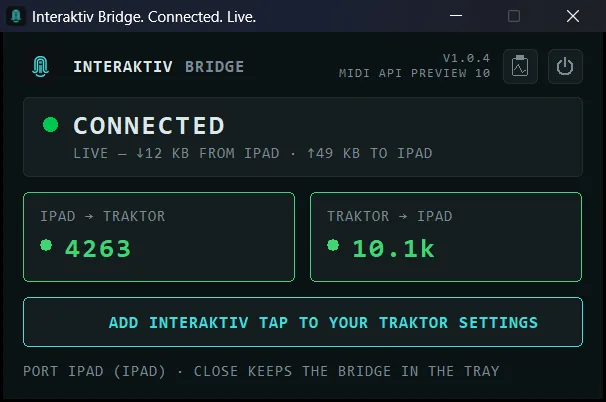
Interaktiv Bridge, connected. The line under the version names the preview of Microsoft’s MIDI API it includes.
From version 1.0.4 on the Microsoft Store, Interaktiv Bridge includes a preview of Microsoft’s Windows MIDI Services API and talks to the MIDI service built into Windows 11, so there is no MIDI software to install beside it.
Windows 11 25H2 or newer. Microsoft’s terms for the API allow it only from 25H2 on, so that is where the Store offers the bridge. An older Windows 11 gets there free through Windows Update.
No MIDI software to install. The bridge no longer downloads Microsoft’s MIDI runtime: the service is part of an up-to-date Windows 11. Apple’s free Apple Devices app is still needed, opened once.
Windows’ MIDI settings stay yours. The bridge no longer repairs them. When one is in the way, the window says LEGACY MIDI MODE IS ON or WINDOWS MIDI NEEDS REPAIR, and OPEN MICROSOFT'S GUIDE opens Microsoft’s own article on the fix.
Back by itself when Windows restarts its MIDI service. The bridge starts the service again, and the port is back in about ten seconds. If Traktor was using the port, restart Traktor; the window says so.
Quit from the window. The power symbol at the top right quits the bridge, after asking. The tray menu still has Quit Interaktiv Bridge.
Everything the window can say, and what to do about each, is at interaktivaudio.com/bridge and in the manual.

 Scan with your iPad
See what Interaktiv Bridge does →
Scan with your iPad
See what Interaktiv Bridge does →